TimeTracker RX release
Towards an Integrated Management System Guided by Data, Predicting the Future
Under the brand message, "Updating society and the future with cutting-edge software development technology," we are releasing a new integrated management system, "TimeTracker RX."
Evolving from "TimeTracker NX," which previously specialized in man-hour management, it now centrally manages project allocation, revenue/cost, quality/risk, allowing for accurate understanding of the overall organizational situation.
TimeTracker RX is a "next-generation integrated management system" that directly links on-site data to management decisions, enabling predictive capabilities for the future.
When using the Excel Integration Add-in with TimeTracker RX 1.0, please confirm that the version is as shown in the diagram below.
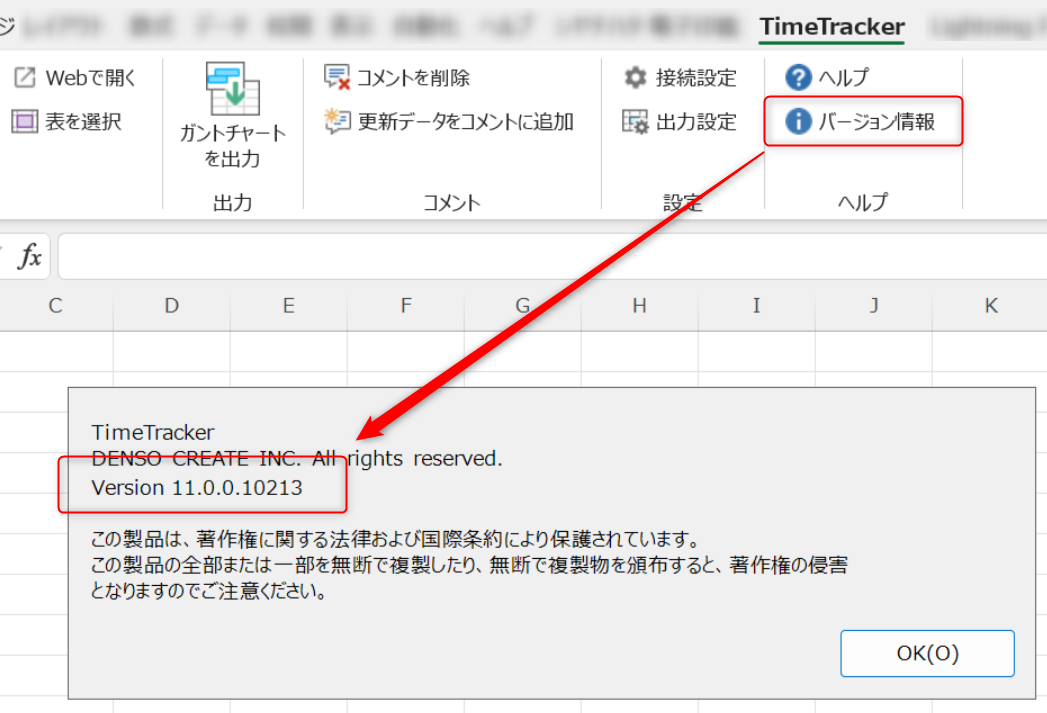
The Excel integration add-in installer is included with the TimeTracker RX installer.
New Features
Project Planning (Step 1: Staffing Planning Function)
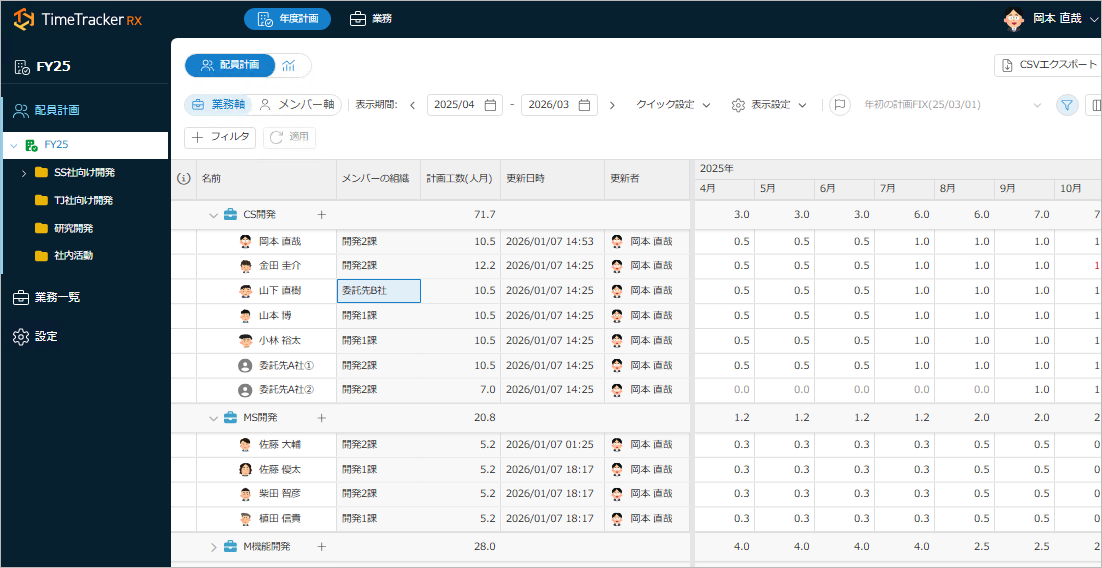
Build your project starting with "people allocation." – That's staffing planning.
"Who," "when," and "which task" to assign staff to can be planned intuitively,
and this directly translates to project plan input.
Plans on the Gantt chart and daily results are aggregated in real time on the staffing planning screen,
and even in the event of unexpected tasks, you can immediately determine who to assign.
Link to details: "What is a Business Plan?"
Easier Time Entry with "Collaborators"
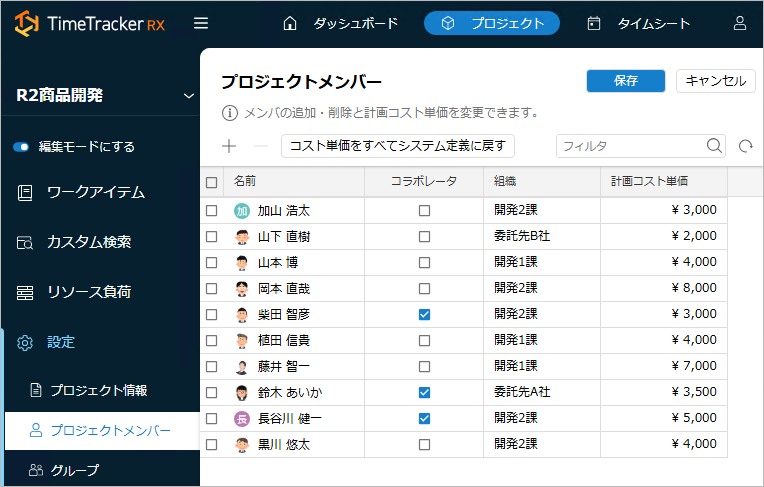
No longer need to allocate resources "solely for time entry" in the timesheet. By designating users as "Collaborators," the target items are automatically displayed, allowing for immediate time entry.
This reduces setup effort and the time spent searching for input targets, resulting in a more comfortable user experience.
Links to details: "Making Members Collaborators", "Utilizing Collaborators"
Flexible Permission Settings for Smooth Cross-Organizational Management
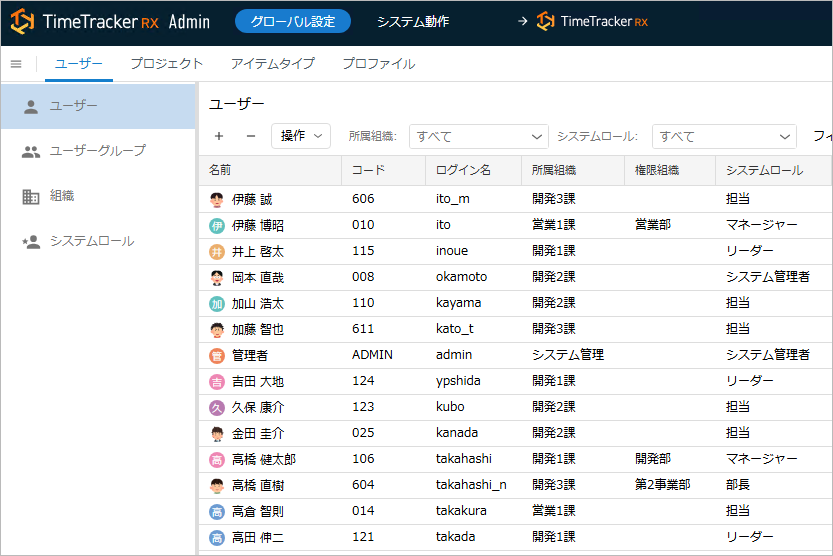
The newly added "Permission Organization" feature allows you to grant permissions to organizations outside of the user's own.
This enables cross-departmental management without individual project settings or organizational changes.
This reduces the burden of configuration work and minimizes server load.
Link to details: "Define Users"
Freely customize "How Field Values are Determined"
You can now specify default items for the "How Values are Determined" of each field in the Gantt table.
This eliminates the need to change settings every time an item is created, and predefined calculation formulas can be applied smoothly.
This reduces setup time and increases the flexibility of project operations.
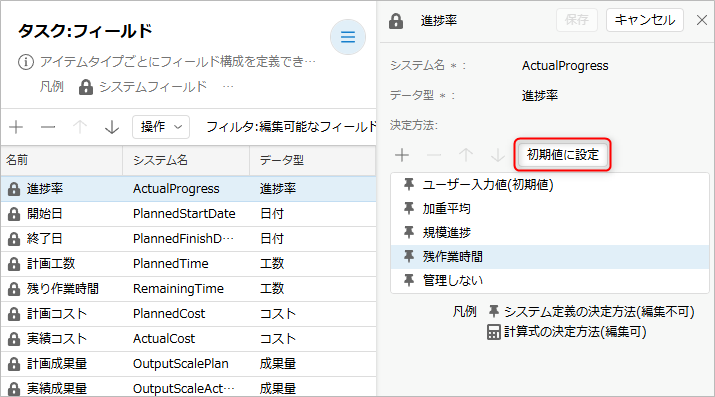
Link to details: "Define Fields"
Make WBS operations even faster
Numerous features have been added to streamline WBS work, such as value setting by drag and fill, copying linked relationships, and bidirectional resource allocation.
Furthermore, multi-line text can be viewed and edited directly on the Gantt table.
With intuitive operation similar to Excel, the time and effort required for setup are significantly reduced.
- "Excel-like Drag-Fill": Field values can be copied efficiently with intuitive operation.
- "Copy Link Information with WBS Copy from Template": Links between items can also be copied.
- "Direct Import of Table Definitions and Custom Searches": Settings from other projects can be reused immediately.
- "Change Screen Layout": The layout can be changed on the spot without opening the settings screen.
- "Enhanced Excel Integration": Resource allocation can now be reflected bidirectionally with Excel.
Improvements
Custom Search
Integrating Search, Confirmation, and Update. Smoother Data Utilization
The usability of the custom search function has been significantly improved. You can now directly edit and update data from the search results, enabling speedy work without screen switching or rework. Furthermore, the ability to switch long text fields to multi-line display improves the readability of information. Understanding and updating information across projects is now smoother than ever.
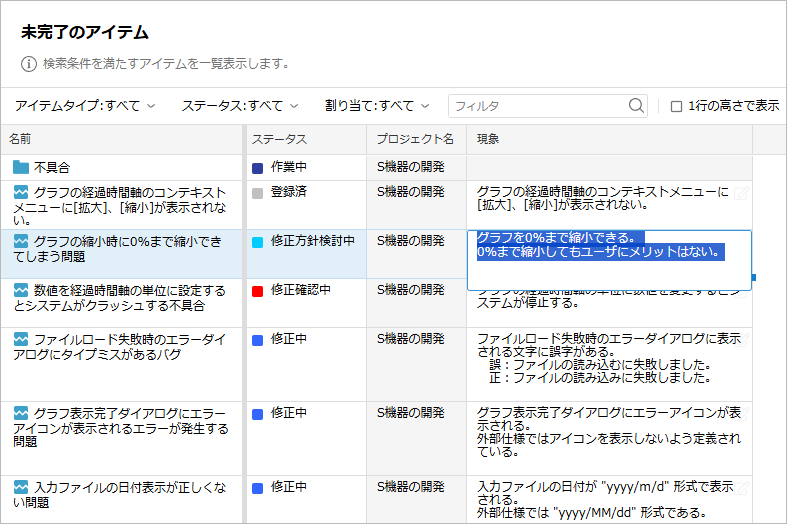
Link to details: "Editing Field Values"
Timesheet
- Directly display item properties from the context menu within the timesheet
- Improved usability by adding a toolbar to My Work Items
- Added "Today" to the Quick Report aggregation period
- Improved speed to open timesheets faster
If there are more than 100, the display will be as shown in the image below.

Right-click on any unnecessary projects and hide them.
My Page
- Hide projects you don't want to view
Work Item Screen
- Display the date in the "Update Date" field as the date the user updated it.
Previously, the "Update Date" field was also changed for cumulative updates due to changes in child items, but now only updates made by the user are displayed.
Bug Fixes
The following bugs have been fixed.
- Timesheet
- Gantt Table
- If the start date and end date times are not 0, a system error occurs when opening the Gantt table screen.
- Custom fields still appear in the Gantt table column selection even after being deleted.
- Pivot Analysis
- When exporting pivot analysis data to Excel, the "person-months" and "person-days" values are displayed in minutes.
- Installer
- Using special characters in the DB password will cause the installation to fail.
- Administration Screen
- In some cases, not all members displayed in the user group may be shown on the system administration screen.