I don't know the server name and site name to specify in the URL
Overview
To use TimeTracker RX, you need the URL information of the website on the server.
This document explains how to deal with situations where you don't know the server name and site name to specify in the URL after setting up the server environment.
URL Structure
The format of the URL to enter in the browser's address bar is as follows:
http://(server name)/(site name)/login
Example: http://WebServer/TimeTrackerRX/login
How to Check the Server Name and Site Name
You can check this from "Internet Information Services (IIS) Manager".
The following are the steps to check:
- Launch "Internet Information Services (IIS) Manager" from the Windows [Start] menu - [Administrative Tools].
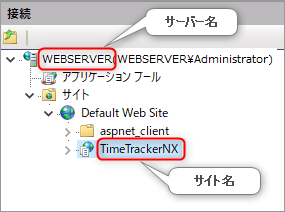
- Check the server name and site name in the [Connection] section displayed on the left side of the screen.